
Why Your Restaurant Doesn't Need a POS System to Launch a QR Menu
Most restaurants go digital to give guests a better way to see the menu — not to take full operational control. Learn why a QR menu is enough to start, when a POS system is still essential, and how to build a lean restaurant tech stack instead.
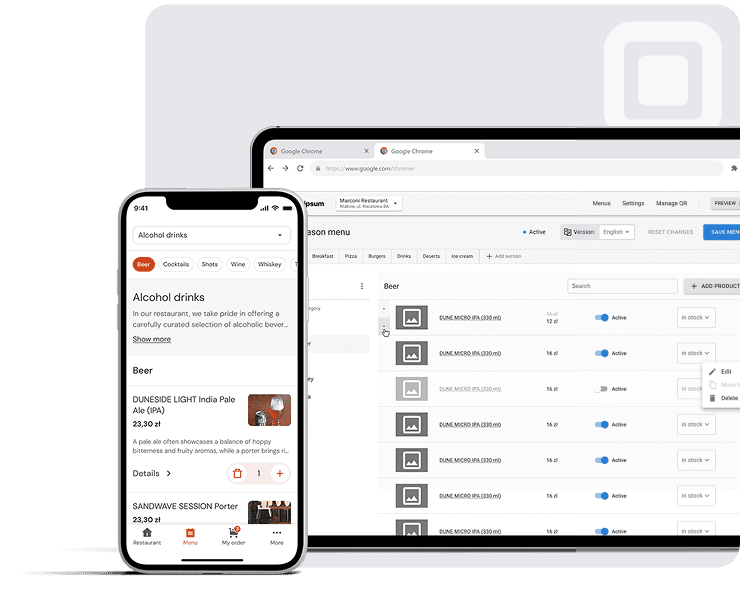
For many restaurant owners, the decision to go digital starts with a familiar question: Do we finally need a POS system?
POS (Point of Sale) system is a combination of software and hardware that restaurants use to manage sales and day-to-day operations.
It sounds logical. POS systems have long been positioned as the backbone of restaurant operations — handling payments, reporting, kitchen coordination, and compliance. But in practice, most restaurants don't start their digital journey because they need full operational control. They start because they need something far simpler: a better way for guests to see the menu.
This distinction matters. Because if your immediate goal is to give customers fast, mobile access to your dishes, update prices instantly, or support multiple languages for tourists, a full POS system is not the only option — and often not the best first step.
The rise of QR menu systems and QR ordering has introduced a different approach: start with the guest experience first, then add operational layers later if needed. For many restaurants across Europe — especially cafés, bars, bistros, and seasonal venues — that shift changes everything.
What restaurant owners usually mean when they say "I need a POS"
POS is useful — but it is not the same as a digital menu
A POS system is a powerful tool — but it solves a very specific set of problems.
At its core, a POS system functions as a staff-facing operational backbone. It manages transaction processing, staff order entry, kitchen communication, reporting, cash management, and tax-related workflows. It often connects to printers, terminals, and back-office systems.
In other words, a POS system is built for staff efficiency and operational control — not for guest discovery.
This is where confusion starts. Many restaurant owners associate "going digital" with "installing a POS," but these are not the same decision.
A QR menu solves a narrower, faster problem
A QR menu system solves something much more immediate: how guests access and interact with your menu.
With a QR code at the table, customers can:
- ✓Open the menu on their phone instantly
- ✓Browse dishes with descriptions and photos
- ✓See promotions and highlights
- ✓Access multilingual versions of the menu
- ✓Avoid waiting for printed menus or staff
This is a customer-facing system, not a staff-facing one. It doesn't replace your operations — it improves your front-of-house experience.
| What owners think they need | What they actually need first |
|---|---|
| Full POS system | Mobile-friendly digital menu |
| Complex integrations | Fast menu updates |
| New hardware & terminals | QR codes on tables |
| End-to-end system | Better guest experience |
The short answer: you don't need a POS system just to launch a QR menu
If your goal is straightforward — improve how guests access your menu — you can do that without a POS system.
If your goal is menu access, updates, photos, promotions, and translations, a QR menu is enough
Modern QR menu systems allow you to:
- Launch quickly (often within minutes)
- Avoid buying hardware
- Update prices and dishes instantly
- Add photos and descriptions
- Highlight promotions or high-margin items
- Offer multilingual menus for international guests
This makes them particularly attractive for independent restaurants and tourist-heavy venues where flexibility matters more than system complexity.
What a QR menu does not try to replace
It's equally important to understand what a QR menu is not.
A QR menu system does not replace:
- Fiscal cash registers or legal compliance systems
- Full accounting or payroll solutions
- Deep operational reporting
- Inventory management platforms
A POS system still plays a critical role in these areas. The key insight is that you don't need all of that just to launch a digital menu.
Need vs Don't Need (to start with QR menu)
Need
- ✓Digital menu access
- ✓Easy updates
- ✓Mobile-friendly interface
- ✓Translations
Don't need
- ✕Full POS system
- ✕Hardware setup
- ✕Complex integrations
- ✕IT team
POS vs QR menu vs QR ordering: what is the difference?
Confusion in this space often comes from overlapping terminology. "Digital menu," "QR ordering," and "POS system" are often used interchangeably — but they describe very different tools.
POS system: the staff-facing operational backbone
A POS system sits behind the scenes. Staff use it to:
- ✓Process payments
- ✓Enter orders
- ✓Send tickets to the kitchen
- ✓Track sales and performance
- ✓Manage cash and reports
- ✓Handle tax compliance
Customers rarely interact with it directly.
QR menu: the guest-facing digital menu
A QR menu system is the opposite: it is entirely customer-facing.
Guests scan a code, open a mobile interface, and browse the menu. They can explore dishes, check photos, and decide what to order — without waiting.
Some systems also allow guests to save favorites or view additional venue information.
QR ordering: when guests also submit orders or pay
QR ordering builds on the QR menu by adding:
- ✓Order placement
- ✓Customization (modifiers)
- ✓Payment directly from the phone
- ✓Order routing to staff or kitchen
This is where the line between customer-facing and operational systems starts to blur.
While QR ordering can streamline service, it also introduces additional operational responsibilities. Restaurants must manage digital orders, monitor incoming requests, ensure orders are correctly routed to the kitchen, handle payment-related issues, and provide support when guests experience technical difficulties. Staff also need clear procedures for verifying, modifying, or correcting orders when necessary.
In addition, some guests may be reluctant to enter payment details on their phones or rely entirely on self-service ordering. Restaurants therefore need to consider data protection, payment security, staff training, and guest support as part of the implementation process.
For many venues, this is the key distinction between a QR menu and QR ordering: a QR menu primarily improves access to menu information, while QR ordering becomes part of the restaurant's operational workflow and requires ongoing management, oversight, and customer support.
Full POS ecosystem: when QR is just one layer
A full POS ecosystem combines everything:
- ✓POS system
- ✓QR ordering
- ✓Payments
- ✓Reporting
- ✓Integrations
This can be powerful — but it can also be excessive if your primary goal is simply to improve the menu experience.
| System type | Who uses it | Main function |
|---|---|---|
| POS system | Staff | Operations, payments, reporting |
| QR menu (view-only) | Guests | Browse menu |
| QR ordering | Guests | Browse, order, pay |
| Full POS ecosystem | Both | End-to-end restaurant management |
When a full POS system is overkill
You only want a better menu experience
If your main issue is that:
- Printed menus are outdated
- PDF menus are hard to read
- Updates take too long
Then a full POS ecosystem is more than you need.
You do not want new hardware, printers, terminals, or IT setup
Traditional POS setups often require:
- Terminals
- Printers
- Installation
- Configuration
Some systems even impose specific hardware requirements. For small or independent venues, this adds cost and complexity.
A QR menu system avoids this entirely.
You need speed, not a six-week software project
For many restaurants, especially seasonal or newly opened venues, timing matters. Waiting weeks to implement a system is not always realistic.
A QR menu for restaurants can often be launched the same day.
POS overkill signals
- You're only trying to replace paper menus
- You don't want new hardware
- You need something live quickly
- Your team is small or reduced
- You don't need deep reporting yet
What a QR menu system can replace immediately
Printed menus and PDF QR codes
Many restaurants start with a PDF behind a QR code. While this works as a quick workaround, it is not a true digital experience.
PDFs:
- Are difficult to read on mobile
- Don't adapt to screen size
- Are hard to update frequently
A proper digital menu is structured, interactive, and mobile-first.
Manual price and availability changes
With a QR menu:
- Prices can be updated instantly
- Unavailable items can be hidden
- Seasonal dishes can be added in minutes
No reprinting, no delay.
Static promotions and upsell limitations
A digital menu allows you to:
- Highlight high-margin items
- Pin promotions at the top
- Adjust visibility dynamically
This gives you control over how guests navigate your menu.
Language barriers for tourists and international guests
For restaurants in Europe — especially in tourist areas — a multilingual QR menu provider is not optional.
A QR menu can:
- Automatically display multiple languages
- Reduce misunderstandings
- Improve service speed
Typical scenario
A small café in Kraków serves Polish and international tourists. With a printed menu, staff constantly translate dishes. After switching to a multilingual QR menu, guests browse in their own language — reducing staff workload and improving accuracy.
What a QR menu system should not replace
Fiscal compliance and certified cash register rules
Across Europe, fiscal regulations vary significantly.
Examples include:
- Germany: KassenSichV requires certified technical security systems (TSS)
- Belgium: HoReCa businesses above thresholds must use certified cash registers
- France: certified software for payments and receipts
A QR menu does not replace these requirements.
"Digital menus improve access — not fiscal compliance. These are separate layers in the restaurant tech stack."
Complex inventory, accounting, or payroll workflows
If your restaurant needs:
- Detailed reporting
- Cash drawer reconciliation
- Shift tracking
- Integrated accounting
Then a POS system may still be essential.
Fine dining and service-led experiences
In fine dining, the experience is built around staff interaction. In these cases:
- Table service is central
- Staff control pacing and recommendations
- Technology plays a supporting role
Here, a POS-led workflow still makes sense.
| QR menu helps with | Requires POS / compliance check |
|---|---|
| Menu access | Fiscal compliance |
| Updates | Tax reporting |
| Translations | Cash management |
| Promotions | Receipt generation rules |
The lean restaurant tech stack: what you actually need instead of POS
For many restaurants, the most practical approach is not "POS or no POS" — but starting with a lean stack.
QR menu for guest browsing
This becomes your primary guest interface:
- Menu display
- Photos
- Descriptions
- Promotions
- Translations
Existing cash register for compliant receipts
You can keep your current setup for:
- Payments
- Receipts
- Compliance
This avoids legal risks while adding flexibility.
Staff workflow for taking final orders
In a QR menu-first model:
- Guests browse independently
- Staff take orders faster
- Communication improves
| Layer | Tool |
|---|---|
| Guest experience | QR menu system |
| Compliance | Existing cash register |
| Operations | Staff workflow |
Which restaurants can skip POS at the beginning?
Cafés, bars, and small restaurants
These venues often prioritize:
- Speed
- Simplicity
- Low cost
They benefit most from QR-first setups.
Tourist-heavy restaurants
Multilingual menus are critical here. QR systems reduce friction for:
- International guests
- Short-term visitors
- High turnover environments
Seasonal venues and pop-ups
For:
- Beach bars
- Summer terraces
- Event-based restaurants
A quick, no-hardware setup is ideal.
Restaurants testing a new concept
Menus change frequently in experimental venues. A QR system allows:
- Fast updates
- Multiple menu versions
- Seasonal variation
| Venue type | QR menu without POS |
|---|---|
| Café | ✅ Strong fit |
| Bar | ✅ Strong fit |
| Tourist restaurant | ✅ Strong fit |
| Seasonal pop-up | ✅ Strong fit |
| Fine dining | ⚠️ Limited fit |
When you probably do need a POS system
You need certified fiscalization tied to sales
If your country requires:
- Certified registers
- Secure transaction logs
- Integrated reporting
A POS system is often necessary.
You need deep operational reporting and cash management
For:
- Multi-shift operations
- Large teams
- Financial oversight
POS systems provide essential control.
You run a full-service or fine-dining venue
In these cases:
- Staff-led ordering defines the experience
- POS workflows align with service models
You want one ecosystem for everything
Some restaurants prefer:
- One system for ordering, payments, reporting
This is where full POS ecosystems are appropriate.
Decision snapshot
Use QR menu first if:
- You want to improve menu experience
- You need fast setup
- You prefer low complexity
Consider POS if:
- You need compliance integration
- You require deep reporting
- You want all-in-one systems
How to start with Platoo without buying a POS system
Create your digital menu
You can set up a free QR menu quickly — often in minutes — without technical expertise.
Add dishes, photos, prices, promotions, and translations
Build your menu with:
- Dishes and descriptions
- Photos
- Pricing updates
- Multilingual versions
Print QR codes and place them on tables
Guests simply scan and browse.
Keep your current cash register for payments and compliance
This ensures:
- Legal safety
- Operational continuity
- Create menu
- Add content
- Generate QR code
- Place on tables
- Start using immediately
Related reading
FAQ
No. A QR menu system can function independently if your goal is to provide a digital menu experience.
No. A QR menu allows browsing, while QR ordering includes placing orders and sometimes payments.
Yes, many restaurants combine QR menus with their current cash register.
No. Compliance depends on country-specific regulations and often requires certified systems.
When you need transaction processing, reporting, cash management, and compliance in one system.
Cafés, bars, small independent restaurants, seasonal venues, and tourist-heavy locations.
Because PDFs are not mobile-friendly, hard to update, and lack interactive features.
Sources: Bundesministerium der Justiz (Germany). Kassensicherungsverordnung (KassenSichV) — technical security requirements for electronic cash register systems. · FPS Finance (Belgium). Registered Cash Register System (GKS/SCE) for the HoReCa sector. · Ministere de l'Economie (France). Certification of cash register software (loi n° 2017-1837 de finances pour 2018). · EUR-Lex. Regulation (EU) 2016/679 (General Data Protection Regulation, GDPR). · EUR-Lex. Directive (EU) 2015/2366 (Payment Services Directive 2, PSD2) — strong customer authentication.