
How to Structure a Restaurant Menu So Guests Don't Get "Lost" (Categories and Number of Items)
Split your menu into 5–7 clear categories, keep 5–7 items in each, and order them to follow the logic of a meal — appetizers, main courses, sides, desserts, drinks. On a digital or QR menu, this turns an endless feed of dishes into a decision the guest can make quickly, without scrolling past dozens of items.
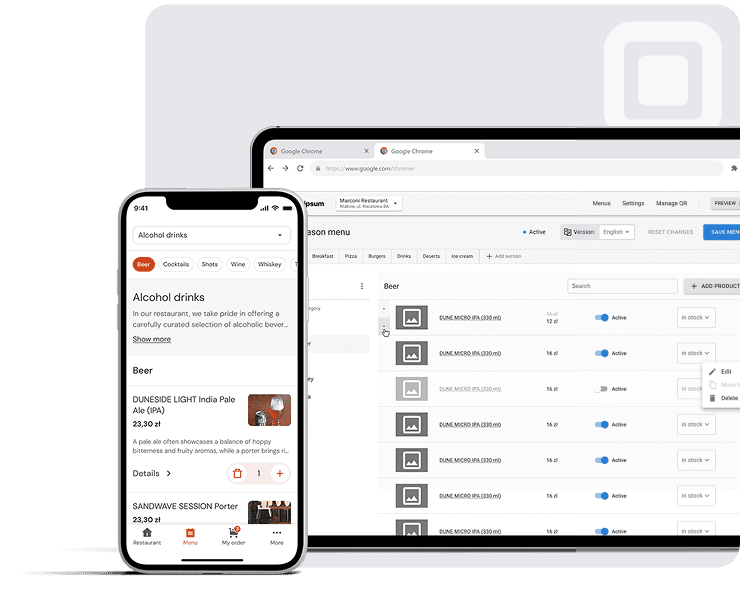
Most advice about the "ideal" menu size comes down to design — fonts, colors, photos. But the real problem the guest runs into is navigation. A menu is, in essence, information architecture. If a guest can't quickly find the right category, or a category holds too many near-identical options, they either fall back on something familiar or put the decision off entirely. Both outcomes cost the restaurant money. In this article we'll break down how to structure categories, how many items to keep in each, and why a digital menu solves these problems more easily than a printed one.
Why Menu Structure Is a Question of Navigation
When a person opens a menu — paper or on a phone screen — they aren't reading it for entertainment. They're trying to make a decision quickly enough to get back to the conversation, order drinks, and bring forward the moment when food lands on the table. A menu organized around the logic of the kitchen (or around how the designer thinks a menu "should look"), rather than around how the guest's eye and attention actually move across the page, works against that goal.
On a phone, this doesn't matter less — if anything, it matters more. A printed menu has natural boundaries: the page ends, there's a fold, the guest can flip back. A digital menu on a phone is often a single long vertical feed. Without clear category anchors, the guest can lose their place, forget what they've already seen, or simply give up scrolling before reaching the desserts or drinks. The solution isn't visual polish but a navigational structure that, at any moment, tells the guest where they are and what comes next: pinned category headers, a visible "you are here" indicator, and a logical order that mirrors the structure of the meal itself.
Format Matters Too: Single Page, Booklet, or Spread
Before getting to categories and item counts, it's worth flagging the question of format — it shapes everything else. A traditional printed menu usually takes one of a few forms: a single sheet, a folded menu (bifold/trifold), or a multi-page booklet. Each format implicitly sets a ceiling on how much content you can show before the guest has to physically turn something over — a single-page menu forces hard prioritization, while a booklet can hold more categories but risks "burying" the far sections in places guests simply never look.
A digital menu doesn't have that constraint in the old sense — the physical page never ends — but that's exactly why structure doesn't lose its importance; it only becomes more important. Without a fold or a page break to serve as a natural stopping point, the only thing keeping the guest from an endless, undifferentiated scroll is the structure of categories and navigation itself. In effect, a digital menu replaces the physical constraints of format with navigational ones: the question shifts from "how much fits on a page" to "how much the guest can hold in their head while scrolling."
Decision Fatigue: Why It's Not Just Volume but the Order of Decisions
There's another effect, tied to the sequence of decisions, worth accounting for alongside the number of items. Decision fatigue describes how the quality of a person's decisions gradually declines after a series of choices — not because any one decision was hard, but because each one draws on the same limited pool of attention. A guest who's just spent two minutes choosing among eight appetizers approaches the dessert section with less appetite for detail than they had at the start — no matter how appealing the desserts themselves are.
That's why the order of categories matters just as much as their size. The most important decision — usually choosing a main course — is best shown earlier, while the guest's attention is still fresh, and less significant categories like sides, drinks, and desserts left for later. That way the menu's structure works with the decision-fatigue effect rather than against it. A menu that dumps its longest and most complex category on the guest right at the start — exactly when their attention is still full — loses in advance, before they've read the description of a single dish.
How to Structure Menu Categories So No One Gets "Lost"
The Category Rule: 5–7 Main Groups Built on a Standard Set
For most restaurants, the range of five to seven main categories works best. Fewer, and different types of dishes end up awkwardly lumped together; more, and the list of categories itself becomes something the guest has to "parse" before even glancing at a single dish.
A traditional full-service menu is usually built on a recognizable set: appetizers, main courses, sides, salads, soups, sandwiches, desserts, drinks, and specials. Not every restaurant needs all nine categories — a lunch café might merge soups and salads into one category and skip "specials" entirely, while a fine-dining restaurant might split main courses by type of protein. The point isn't to hit a specific number of categories for its own sake — what matters is that each category represents a meaningfully different type of decision for the guest, rather than splintering similar options into overlapping groups.
Category Order Should Match How People Eat
Guests scan a menu the same way they'd scan a page of text: left to right, top to bottom. That means whatever comes first sets the frame for everything else. The most intuitive order mirrors the sequence of the meal itself — appetizers, then main courses, sides, desserts, drinks — because it lines up with the guest's existing mental model of "how a meal goes." Categories that don't follow this logic (desserts before main courses, drinks all the way at the bottom after ten other sections) force the guest to put in extra effort to find what they're looking for.
Ordering for a Digital Menu: "Best Sellers" First
A printed menu is reprinted rarely and is mostly static. A digital menu can — and arguably should — open differently. Placing a "Best Sellers" or "Popular" category first, ahead of the traditional appetizers-to-desserts sequence, gives guests who don't want to deliberate a fast, effortless path to a good decision, while guests who want to browse the whole menu can simply scroll past that category and move on to the familiar structure beneath it.
Mobile Navigation Patterns That Keep Guests From Getting "Lost"
On a phone screen, category structure alone isn't enough — it needs to be paired with navigation that stays usable as the guest scrolls. A few patterns do most of the work:
- A pinned category bar that stays at the top of the screen while scrolling, so the guest always knows which section they're in and can jump to another in a single tap.
- Anchor links from a "table of contents" at the top of the menu, leading straight to each category — letting the guest skip the scroll entirely.
- Collapsible categories that are closed by default and show only their names until the guest opens the one they want — useful for menus with many categories or long lists of items within them.
None of this requires reworking the menu's content itself — these are navigational layers on top of the same category structure, and they're exactly what separates a menu that "feels long" from one that "feels organized."
| Printed-menu logic | Digital/QR-menu logic | |
|---|---|---|
| Opening section | First page, usually appetizers | "Best Sellers" or "Popular" first, then the traditional order |
| Category boundaries | Physical page breaks, folds | Pinned headers, anchor links, collapsible blocks |
| Finding an item | Flipping pages, visual browsing | Tapping a category or scrolling |
How Many Items Should a Menu Have? Is There an "Ideal" Number?
The Short Answer
As a starting point, aim for roughly 5–7 items per category and 5–7 categories overall. This is a guideline, not a hard ceiling — the "main courses" category at a steakhouse can reasonably be longer than the "pastries" category at a café — but it's a sensible default for most full-service and fast-casual menus, and a signal to revisit your structure if any one category noticeably exceeds the range.
Where the Number 5–7 Comes From: Two Different Studies, the Same Boundary
This isn't a designer's rounded-off intuition — the range has a concrete experimental history, and it's worth understanding which data it grew out of.
The first source is Sheena Iyengar and Mark Lepper's 2000 experiment, published in the Journal of Personality and Social Psychology. At a tasting table in a grocery store, shoppers were offered either 6 or 24 varieties of jam at different times. The display with 24 varieties drew more onlookers, but only 3% of those who approached it made it to the checkout — versus 30% at the table with six varieties. A tenfold difference, from a fivefold increase in the number of options. The authors called this choice overload: past a certain threshold, additional options don't help you decide — they get in the way. In the same series of experiments, a similar drop in conversion reappeared with chocolates and with essay topics for a university course — meaning it isn't about jam specifically, but about the very mechanics of comparing a large number of similar options.
The second source is older and formally about something else. Psychologist George Miller's 1956 paper "The Magical Number Seven, Plus or Minus Two" in Psychological Review dealt with the limits of short-term memory: how many separate "units" — digits, tones, categories — a person can hold in mind at once and reliably tell apart. Miller's answer was about seven. Applied to menus, this finding explains why a thirty-item category doesn't turn into thirty real alternatives for the guest: the list gets so long that deliberate comparison shuts down, and the choice slides toward something already familiar or simply the first thing seen.
It's worth marking the limit of this analogy right away. Miller wasn't writing about restaurants but about memory, and later work — in particular, a reexamination of the "magical number seven" — shows that the real limit of working memory for many tasks is closer to three or four units than to seven. So the "rule of seven" as applied to menus is a heuristic derived from this research tradition, not a direct result of an experiment on menus. That doesn't strip it of value: 5–7 remains a reasonable working figure. But it's an extrapolation, and restaurants with a solid reason to stretch a category — the steak selection at a steakhouse, the list of pizza toppings — shouldn't treat seven as an unbreakable ceiling.
The "Ideal" Number Depends on the Type of Restaurant
A quick-service establishment built around speed benefits from a more compact menu than a fine-dining restaurant where guests are inclined to linger over a multi-course meal — the 5–7 range is a reasonable starting point for QSR (quick-service restaurants) and casual dining (everyday restaurants without strict formalities), while tasting menus at fine-dining venues or the cuts at a steakhouse can reasonably run longer, given the nature of the decision the guest is making. There's no single number that fits every concept — the task is to match the number of items to how much time and attention guests are actually willing to spend on that category.
A handy way to think about it: the acceptable size of a category grows with how distinguishable the items inside it are to the guest. Ten kinds of pasta that differ mostly in their sauce may register as ten near-identical decisions and trigger the same overload described in the jam study. Ten dishes spanning genuinely different proteins, cooking methods, and flavor profiles are far easier to tell apart — which is why such a category can comfortably run longer without the same cognitive load.
The 80/20 Reality: Cut the "Dogs," Promote the "Stars"
When a menu already exists, the question shifts from "how many items should there be" to "which items deserve to stay." This is where menu engineering comes in — each dish is plotted on two axes, profitability and popularity, forming four categories: "Stars" (high profitability and popularity — promote), "Plowhorses" (low profitability, high popularity — popular but not profitable enough), "Puzzles" (high profitability, low popularity — worth nudging with placement or description), and "Dogs" (low profitability and popularity — candidates for removal). Running every menu item through this framework, even informally, is usually the fastest route from "too many items" to "the right items."
Combos, Sets, and Modifiers as a Structural Tool
Cutting the number of items isn't the only path; sometimes the better move is to combine rather than remove. Combos and sets (a sandwich with a side and a drink, an appetizer paired with a main course) let a menu offer fewer top-level decisions while preserving the same variety — because the variation moves from the plane of "which dish" to the plane of "which option within this dish." Modifiers work on the same principle but at a smaller scale: instead of listing a pizza in four sizes as four separate menu lines, a single item with a size modifier visually shortens the category without losing the choice.
This is also where the line runs between "menu structure" and "ordering mechanics," and it's worth being precise about what a given digital-menu platform actually supports. At Platoo, in particular, the modifier system is built around portion-size options — a dish might have a standard and a large portion, for instance — rather than around a broader engine for upsells or combo-building. For restaurants whose item-count problem stems from each size or variant being listed on its own line, that modifier alone is a meaningful structural simplification, even without a full set-building system on top.
Structuring Allergen and Dietary Information for EU Guests
The 14 Allergens — Mandatory Everywhere in the EU; the Form of Disclosure Set by Each Country's Law
For restaurants in the EU, menu structure is not only a matter of convenience but a matter of legal compliance, and here design has almost no room to maneuver. Regulation (EU) No 1169/2011 on the provision of food information to consumers requires food-service establishments to disclose allergen information for dishes sold "loose" — that is, prepared and served on the spot rather than sold in factory packaging. The rule has applied since 13 December 2014 (the date is confirmed on the European Commission's food-safety page) and draws no distinction between a packaged product and a dish served to a guest straight from the kitchen. The list is closed and consists of 14 categories: cereals containing gluten, crustaceans, eggs, fish, peanuts, soybeans, milk, nuts, celery, mustard, sesame, sulphur dioxide and sulphites, lupin, and molluscs.
A detail that's easy to miss: the regulation itself mandates disclosing allergens (Article 44(1)(a)), but it deliberately does not standardize the specific form of disclosure — in writing, verbally on request, through staff, or some combination — and instead hands that explicitly to the national legislation of each member state (Article 44(2)). In practice this means there's no EU-wide "must be in writing" rule: some countries require a written document or icons right on the menu, while others allow verbal disclosure provided the menu carries an explicit "ask staff about allergens" note and staff have written data to draw on. So before launching a menu in a specific country, it's worth checking the local rule rather than relying on one universal formulation — what works for Germany doesn't necessarily match the requirements in France or Italy.
How to Structure This on a Digital Menu: Allergen Labels and Dietary Tags
A digital menu handles this with allergen labels or icons placed right next to each dish, which satisfies the "mark it on the menu" requirement and lets the guest instantly see which ingredients might trigger a reaction. Dietary tags — vegetarian, vegan, gluten-free — add another layer of information on top of the same menu structure, without having to maintain separate versions in parallel.
Done right, this isn't just a compliance "checkbox" — it's a trust signal, especially for guests with allergies, who are often wary of menus where this information is hard to find.
Quick Wins: Placement and Wording That Help Guests Decide
This last section touches on a topic that's already been written about extensively elsewhere, so it's deliberately brief — these are small improvements that work on top of good category structure and item counts, not as a replacement for them.
The "Golden Triangle" and Its More Cautious Version
The classic explanation, repeated in the restaurant industry for decades, goes like this: the eye of someone reading a printed menu first falls to the center of the page, then jumps to the upper-right corner, then to the upper-left — a path dubbed the "golden triangle." From it came a simple rule: put your highest-margin dishes in exactly those three spots.
The effect is real, but not as rigid as it's usually retold. More recent attention measurements show that many guests read a menu the same way they read an ordinary page of text — top to bottom and left to right — and that the most attention goes not to fixed geometric zones but to the beginning and end of each section. The practical takeaway from both versions is the same: an item at the top of a list gets a disproportionate share of attention, while whatever is buried in the middle the guest will most likely skip — regardless of whether they scan the page in a triangle or line by line.
The move to a digital menu only helps here: instead of debating whether a fixed zone exists on a phone screen, it's enough to use what's beyond dispute — the first items in a category, the ones the guest sees before they start scrolling, get the same attention advantage as the upper-left corner of a printed page.
Descriptive Names
One small wording decision comes up again and again in discussions of menu psychology: a dish description that conveys the cooking method, the origin, or sensory details ("slow-braised," "stone-ground," "locally sourced") tends to work better than a bare name with no context — simply because it gives the guest more to anchor a decision on.
The Decoy Effect and Price Anchoring
Another well-known tactic is placing a deliberately expensive item (one that maybe never gets ordered) next to a target item, so the target's price seems more reasonable against the pricier one. This is a form of price anchoring: the guest's sense of what counts as "expensive" or "acceptable" shifts depending on what they saw immediately before. On a menu this often looks like a premium dish at the top of a category, with the items the restaurant actually wants to sell placed right beneath it. It's a placement decision, not a content one — the dish itself doesn't need to change; all that matters is where it sits relative to the others.
Typography and Photos
These two elements cover the most "studied" part of menu psychology, and both are primarily about consistency of application rather than any one "correct" choice. Typography: a clear hierarchy among category names, dish names, and descriptions helps the guest scan the page in the right order, and that hierarchy matters more than the specific fonts chosen. Dish photos help guests unfamiliar with a dish understand what they're ordering — especially for items with unusual names — but inconsistent use of photos (some dishes shot, most not) can make the unphotographed majority look visually secondary by comparison. The shared idea behind both elements is that a system applied consistently across the whole menu does more for navigation than any single tactic.
Related reading
Frequently Asked Questions
Roughly 5–7 items per category and 5–7 categories is a reasonable starting point: enough variety that the menu doesn't feel sparse, but without choice overload.
Most restaurants do well with 5–7 main categories, arranged in an order that matches how a guest eats: appetizers, main courses, sides, desserts, drinks.
Too many options can reduce, rather than increase, the number of purchases. In Iyengar and Lepper's well-known 2000 study, shoppers offered 24 kinds of jam bought in 3% of cases, whereas with 6 kinds they bought in 30% — illustrating how an excess of choice can lead to decision paralysis.
Under Regulation (EU) No 1169/2011, all 14 listed allergens must be disclosed for dishes served in restaurants, not just for packaged products. The disclosure obligation itself is set at the EU level, while the specific form — in writing, verbally on request, or some combination — is determined by each country's national legislation.
Sources: Iyengar, S. S., & Lepper, M. R. (2000). When Choice Is Demotivating: Can One Desire Too Much of a Good Thing? Journal of Personality and Social Psychology, 79(6), 995–1006. · Miller, G. A. (1956). The Magical Number Seven, Plus or Minus Two: Some Limits on Our Capacity for Processing Information. Psychological Review, 63(2), 81–97. · Cowan, N. Why the Magic Number Seven, Plus or Minus Two. An analysis of the limits of working-memory capacity. · European Commission. Food information to consumers — legislation (Regulation (EU) No 1169/2011). · EUR-Lex. Regulation (EU) No 1169/2011 of the European Parliament and of the Council.