
Breakfast, Lunch, Dinner: How to Run Multiple Menus With One QR Code
A restaurant does not need a separate QR code for every service. One QR code can stay on the table while staff switches the active menu between breakfast, lunch and dinner. Learn how manual menu switching works, how to structure multiple menus, and when separate QR codes still make sense.
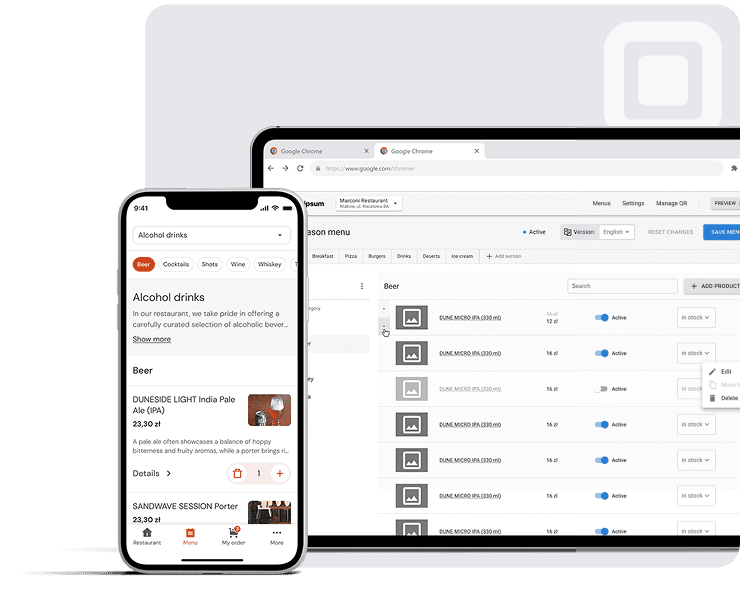
A restaurant can serve breakfast, lunch, and dinner without using a separate QR code for every service.
One QR code can give customers access to multiple digital restaurant menus. The QR code stays the same, while the restaurant changes the active menu that customers see.
For example, a restaurant can make its breakfast menu active in the morning, switch to its lunch menu when the service changes, and then switch to its dinner menu later in the day.
With manual menu switching, staff controls when these transitions happen. Customers simply scan the same QR code and see the menu that is currently being offered.
This approach makes it possible to manage multiple menus while keeping the physical QR setup simple.
Can One QR Code Show Breakfast, Lunch and Dinner?
One QR code can serve multiple restaurant menus
A QR code can act as an entry point to a restaurant's digital menu system. The digital destination can contain multiple menus, such as breakfast, lunch, dinner, drinks, or seasonal menus.
The important distinction is between the QR code itself and the content that customers access after scanning it.
The QR code can remain the same while the restaurant manages the menu content behind it.
The QR code stays the same
A restaurant does not necessarily need to print a new QR code every time its menu changes.
The QR code can remain on tables, counters, signs, or other physical materials while the restaurant updates the digital menu.
This is one of the main advantages of using a digital menu instead of relying on printed menus for every service period.
The active menu determines what customers see
When a restaurant has several menus, it needs a way to determine which menu is currently customer-facing.
The active menu is the menu currently selected for customers.
For example:
Breakfast menu active → customer scans QR code → breakfast menu appears
Later:
Lunch menu active → customer scans the same QR code → lunch menu appears
And later:
Dinner menu active → customer scans the same QR code → dinner menu appears
Example: breakfast → lunch → dinner
Imagine a hotel restaurant that serves food throughout the day. In the morning, the breakfast menu is active: eggs, pastries, pancakes, coffee, and breakfast combinations. When breakfast service ends, staff switches to the lunch menu, and guests arriving for lunch scan the same QR code and see salads, soups, sandwiches, pasta, and main courses. In the evening, staff switches to the dinner menu. The physical QR code has not changed.
How Manual Menu Switching Works
Manual menu switching is useful when restaurant staff needs direct control over which menu customers see.
Instead of relying on a predefined timetable, a member of staff changes the active menu when the restaurant is ready to move to the next service.
Start the day with the breakfast menu
Before breakfast service begins, staff makes the breakfast menu active.
The menu should contain the dishes that are actually available during the morning service.
It is also useful to check:
- menu categories
- prices
- item descriptions
- available dishes
- language versions
Switch to lunch when service changes
When breakfast ends, staff can manually select the lunch menu.
The restaurant does not need to print a new QR code or replace anything on the tables.
The operational flow becomes:
Breakfast active → staff switches menu → Lunch active
Customers scanning the QR code after the switch see the lunch menu.
Switch to dinner later
The same process can be repeated in the evening:
Lunch active → staff switches menu → Dinner active
This gives the restaurant control over the transition without requiring a fixed schedule.
This can be useful when service times vary from day to day. For example, a restaurant may extend breakfast service on weekends or start lunch earlier because of an event.
The QR code does not need to change
The QR code can remain the same while the restaurant changes the active menu.
The code printed on a table, menu card, window sticker, or counter can therefore stay in place.
What customers see after the switch
Customers do not need to perform any additional action because the QR code itself has not changed.
A guest scanning the QR code before the switch sees the currently active menu.
A guest scanning it after the switch sees the newly active menu.
How to Organize Multiple Restaurant Menus
There is no single correct way to structure a restaurant's digital menu.
The best approach depends on how different the menus are and how many dishes are shared between services.
Separate breakfast, lunch, and dinner menus
The simplest structure is to create three independent menus:
- Breakfast
- Lunch
- Dinner
Each menu has its own categories and menu items.
One menu with different categories
Another option is to keep everything inside one menu and organize the content into categories:
- Breakfast
- Lunch
- Dinner
- Drinks
- Desserts
This can work well when many items remain available throughout the day.
A hybrid menu structure
A hybrid structure combines separate service menus with shared items.
For example, a restaurant might have separate breakfast, lunch, and dinner menus while keeping coffee, tea, water, or certain desserts available across multiple services.
Which structure is right for your restaurant?
| Approach | Best for |
|---|---|
| Separate menus | Completely different breakfast, lunch, and dinner offerings |
| One menu with categories | Restaurants with many all-day items |
| Hybrid | Restaurants with separate service dishes and shared items |
The goal is not to create as many menus as possible. The goal is to make the menu structure easy for staff to manage and easy for customers to understand.
One QR Code vs Three QR Codes
Restaurants can use separate QR codes for different menus, but one QR code is often simpler when breakfast, lunch, and dinner share the same customer-facing destination.
Why one QR code is easier to manage
With one QR code:
- ✓staff does not need to replace QR codes
- ✓tables can use the same printed code all day
- ✓customers do not need to choose between multiple codes
- ✓menu changes happen in the digital system
- ✓printed materials remain unchanged
When separate QR codes make sense
Separate QR codes can still be useful when different parts of a business genuinely need different digital destinations.
For example, a restaurant with a separate bar and terrace might decide to use different QR codes if each location has a substantially different customer experience.
One QR code or three?
| One QR code | Separate QR codes |
|---|---|
| One entry point | Multiple entry points |
| One QR code at the table | Different codes for different destinations |
| Easier physical setup | More physical materials |
| Multiple menus behind one code | Each code can lead to a different destination |
| Simple daypart changes | Useful for genuinely separate locations or services |
For breakfast, lunch, and dinner alone, there is usually little reason to make customers deal with three different QR codes.
Manual vs Automatic Menu Switching
There are two common approaches to changing menus during the day: manual switching and automatic scheduling.
Some restaurant menu systems support time-based menu switching, where menu availability changes according to predefined times.
For example:
- 07:00–11:00 → Breakfast
- 11:00–17:00 → Lunch
- 17:00–22:00 → Dinner
What is automatic menu scheduling?
With menu scheduling, a restaurant defines the times when particular menus should become available.
The system then handles the transition according to those rules.
This can work well for restaurants with highly predictable service periods.
What is manual menu switching?
With manual menu switching, staff decides when the transition should happen.
The workflow is:
Staff selects active menu → customers see that menu through the QR code
This can be useful when actual service times do not always match the planned schedule.
Which approach fits your restaurant?
| Manual switching | Automatic scheduling |
|---|---|
| Staff controls the transition | System controls the transition |
| Flexible service times | Predictable service times |
| No schedule configuration required | Requires schedule configuration |
| Useful when service changes | Useful for fixed dayparts |
| Direct operational control | Less manual intervention |
Neither approach is universally better. A restaurant with fixed operating procedures may prefer automation, while a restaurant where service times change frequently may prefer manual control.
How to Handle Menu Changes During Service
Changing the active menu is only one part of digital menu management.
Restaurants also need to keep individual menu items accurate throughout service.
When a dish sells out
If a popular dish sells out, customers should not continue seeing it as available.
Staff should update the item's availability or remove it from the customer-facing menu according to the restaurant's workflow.
When breakfast runs longer than expected
A fixed schedule assumes that service follows the plan.
Real restaurants do not always work that way.
If breakfast service is extended, manual menu switching allows staff to keep the breakfast menu active until they are ready to move to lunch.
When lunch starts earlier
If the restaurant is ready for lunch earlier than expected, staff can switch the active menu rather than waiting for a predefined time.
When a menu item becomes unavailable
A restaurant may need to temporarily remove:
- a sold-out main course
- an unavailable dessert
- a seasonal item
- a dish affected by ingredient availability
Keeping the customer-facing menu current helps avoid situations where guests select something the kitchen cannot provide.
How to Manage Shared Menu Items
When a restaurant has multiple menus, not every item needs to exist only once.
Some products are available throughout the day.
All-day drinks
Coffee, tea, soft drinks, or bottled water may be available during breakfast, lunch, and dinner.
Shared desserts
A restaurant might offer the same dessert during lunch and dinner.
Items available during breakfast and lunch
Some dishes may overlap between services. A café might offer eggs, sandwiches, salads, and coffee during both breakfast and lunch.
Avoiding unnecessary menu duplication
When the same item appears in multiple menus, keep its core information consistent so the item remains clear wherever it is shown.
Pay attention to:
- name
- description
- price
- availability
What Should Change Between Breakfast, Lunch and Dinner?
A daypart menu should reflect a real change in the restaurant's offering.
Not every restaurant needs three completely different menus.
Breakfast menu
A typical breakfast menu may include:
- Eggs
- Omelets
- Pancakes
- Pastries
- Yogurt
- Coffee
- Tea
- Breakfast combinations
Lunch menu
Lunch often has a broader selection:
- Starters
- Soups
- Salads
- Sandwiches
- Pasta
- Main courses
- Desserts
- Drinks
Dinner menu
Dinner may have a different structure:
- Starters
- Main courses
- Sides
- Desserts
- Wine
- Cocktails
- After-dinner drinks
What should remain available all day?
Some categories may not need to change at all:
- Water
- Soft drinks
- Coffee
- Tea
- Certain desserts
If these products are available throughout the day, the restaurant can keep them accessible across multiple menus.
Daily Checklist for Managing Multiple Menus
Before opening
- Check the active breakfast menu
- Verify prices
- Check menu item availability
- Test the QR code
Before lunch
- Switch to the lunch menu
- Verify lunch categories
- Check unavailable items
- Open the customer view
Before dinner
- Switch to the dinner menu
- Check dinner categories
- Verify drinks
- Check availability
- Test the customer-facing menu
During service
The goal is to keep the active menu aligned with what the kitchen is actually serving. Menu switching should therefore be treated as an operational step, not just a content update.
- Remove unavailable items when necessary
- Update menu item availability
- Keep prices and descriptions accurate
- Make sure the active menu matches the current service
How Platoo Fits Into This Workflow
With Platoo, restaurants can manage multiple digital menus behind one QR code.
A restaurant can create separate menus for different services, such as breakfast, lunch, and dinner, while keeping the same QR code at the table.
When the service changes, staff can manually select the menu that should currently be shown to guests. Customers continue using the same QR code, while the customer-facing menu reflects the restaurant's current selection.
This approach keeps the physical QR setup simple while giving restaurant staff control over the digital menu throughout the day.
Related reading
Frequently Asked Questions
Yes. One QR code can provide access to multiple digital restaurant menus. The QR code remains the same while the restaurant changes which menu is currently active.
No. Multiple menus can be managed behind one QR code when they share the same customer-facing entry point.
Yes. With a menu system that supports manual switching, staff can select the menu that should currently be displayed to customers.
No. The QR code can remain unchanged while the menu displayed behind it is updated.
Manual switching is controlled by restaurant staff, while automatic scheduling changes menu availability according to predefined times.
Not necessarily. Restaurants can use separate menus, one menu with categories, or a hybrid structure depending on how their menu items are organized.
Yes. Drinks and other shared menu items can be included in multiple menus when they are available across different services.
Update the item's availability so customers do not see an unavailable dish as currently available.
Final Takeaway
A restaurant does not need three QR codes just because it serves three different menus.
With a digital restaurant menu, one QR code can remain the permanent entry point while the restaurant manages breakfast, lunch, dinner, and other menus behind it.
The key is the active menu: the menu currently shown to customers.
For restaurants using manual menu switching, staff can change the active menu when service changes, whether breakfast runs longer than expected, lunch starts early, or dinner begins later than planned.
The result is a simpler QR setup and more control over the customer-facing menu throughout the day.
Sources: ISO/IEC 18004:2024 — QR Code bar code symbology specification