
QR Code Menu Maker: How to Build One for Your Restaurant in 2026
A QR code generator and a real QR code menu maker solve different problems. Compare static vs dynamic codes, EU allergen rules, multi-language menus, and code placement — with a live demo menu to check against as you read.
What Is a QR Code Menu Maker, Exactly?
Type “QR code menu maker” into a search engine and the results are almost entirely tools, not articles: generators that turn a PDF or a web address into a scannable square, aimed at anyone who wants a table-side menu without printing costs. That makes sense — the habit of scanning a code to see what’s on offer started as a pandemic-era workaround and never really went away, because it turned out to be genuinely more convenient than waiting for a server to bring around a laminated card, and cheaper than reprinting one every time a dish or a price changed.
A QR code menu maker, in the strict sense, does one job: it takes a link or a file and produces a QR code that points to it. Some tools stop exactly there — upload a PDF, get a code, done. Others bundle in a page builder, so the code leads to a proper mobile menu with categories, photos, and prices, rather than a bare scanned document sitting somewhere online. The difference between those two categories matters more than most restaurant owners realize before they’ve already committed to one, printed a stack of table cards, and only then discovered what the tool can’t do.
For a single pop-up stall, a wine list that changes twice a year, or a one-off private event, a bare QR code generator is often genuinely enough: a customer scans, a PDF opens, nobody needs anything more sophisticated than that. For a restaurant that changes prices weekly, adds seasonal dishes, runs more than one location, or needs to comply with food-safety disclosure rules, the gap between “a QR code” and “a menu system” starts to show within the first month of use — usually the first time something needs to change and the fix turns out to be reopening a design file rather than editing a field on a page.
It’s worth being precise about the vocabulary here, because the search results blur it. A QR code is just a container for a short piece of text, almost always a link. A menu is the content a diner actually reads. A “QR code menu maker” can mean a tool that only handles the first part and leaves the second entirely to the restaurant, or a platform that handles both — and knowing which one you’re looking at, before comparing prices or features, avoids most of the frustration that shows up later.
See It Before You Build It
Most tools in this space ask for an account before showing anything real. You sign up, click through an onboarding flow, and only then find out whether the editor, the themes, or the allergen fields fit what your restaurant actually needs — after you’ve already handed over an email address and, in some cases, a card number for a “free trial.” That order feels backwards for something you’re eventually going to hand to a paying customer to judge your food by.
The fastest way to know if a QR menu platform fits your restaurant is to look at a finished one, not a feature list.
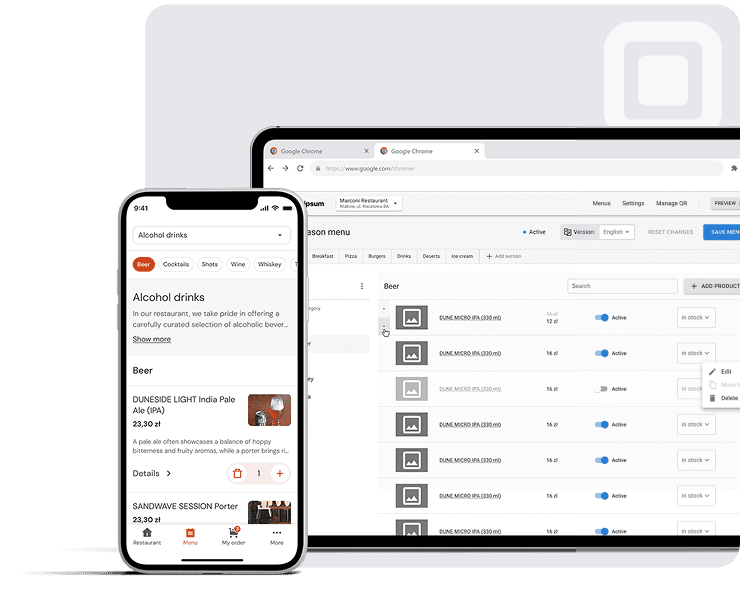
There’s a more direct way to answer the question a features page can’t: open a working QR code menu right now, with no account, no sign-up form, and nothing to fill in. It shows categories, dish photos, prices, and the allergen and language fields discussed further down in this article, rendered exactly the way a diner would see them after scanning a code at a table. If any of what follows raises a “but does this actually look good on a phone, in a dim room, with one hand holding a fork” question, that link answers it faster than a comparison chart or a sales call would.
Treat it as a reference point while reading the rest of this piece: the sections below explain what to look for in a QR code menu maker in general terms, but a live example makes those abstractions concrete in about thirty seconds.
QR Code Generator or Full Menu Platform? The Difference That Actually Matters
Search results for “QR code menu maker” split roughly into two families, and they solve genuinely different problems — a distinction that rarely gets spelled out on the tools’ own marketing pages, since both call themselves the same thing.
The first family is general-purpose QR code generators that added a “menu” option alongside dozens of others: WiFi codes, business cards, event pages, social media profiles, vCards. For these tools, a restaurant menu is one use case among many, and the underlying mechanism doesn’t change based on what’s behind the code. The output is usually a QR code linking to a PDF or an image the restaurant uploads itself. Design, layout, allergen disclosure, translations — all of that stays entirely the restaurant’s responsibility; the tool only handles the code and, at best, a generic landing page wrapped around the uploaded file.
The second family is purpose-built for food service: a menu editor with categories, dish fields, prices, and photos, where the QR code is generated automatically once the menu itself exists as structured data rather than a flat file. These platforms tend to add restaurant-specific features that a generic QR tool has no obvious reason to build, because they don’t apply outside food service — dietary and allergen tags attached to each dish, multi-location management for restaurant groups, and pricing that updates everywhere the moment it’s changed in one place, rather than needing to be re-typed into each language version or each location’s file separately.
A generic QR code generator
is the right call when the menu itself rarely changes, lives happily as a single PDF or image, and doesn’t need allergen tags, translations, or per-item structure — a seasonal pop-up stall, a single-event tasting menu, a wine list that gets revised twice a year at most.
A dedicated menu platform
earns its place once the menu changes often, spans multiple categories and dozens of items, needs allergen or dietary labeling for regulatory reasons, or has to appear in more than one language for a mixed local-and-tourist crowd. In that case, editing a design file and re-uploading it every time is the actual recurring cost being avoided — the QR code itself was never the hard part of the workflow.
There’s a simple test that cuts through most of the marketing language on either side: if updating the menu today means opening a design file, exporting a new PDF, and re-uploading it somewhere, a QR code generator hasn’t solved the restaurant’s real problem — it has just given the old, manual problem a scannable front door. If updating the menu means logging into a page and editing a field, the underlying system has actually changed, and the QR code is just the entry point to it, exactly as it should be.
Scenario — an illustrative example
A typical scenario is a small bistro that adopted a plain QR generator during a menu redesign, printed new table cards, and then found itself back in the same design software three weeks later just to fix a typo in one dish description — because the “menu” was still, structurally, a PDF that happened to have a QR code pointing at it.
Static vs Dynamic QR Codes for a Restaurant Menu
Almost every general-purpose QR generator draws a line between two types of code, and it’s worth understanding the distinction before picking either one, since it shapes what happens the first time the menu needs to change.
A static QR code has its destination baked directly into the pattern itself at the moment of creation. Point it at a menu PDF hosted at a specific web address, and that address is what the code will always open, permanently — move the file, rename it, or take it down, and the printed code simply stops working, with no way to redirect it afterward. A dynamic QR code instead points to a short redirect link controlled by the provider, so the destination behind that redirect can be swapped at any time without touching, reprinting, or replacing the code itself.
| Aspect | Static QR code | Dynamic QR code |
|---|---|---|
| Destination | Fixed permanently at creation | Can be updated at any time |
| Menu changes | Requires generating and reprinting a new code | Same printed code, content updates behind it |
| Scan analytics | Not available | Usually available |
| Typical use | A menu that essentially never changes | Any restaurant that adjusts prices or items |
For a restaurant menu specifically, this isn’t a marginal technical footnote — it determines how much reprinting a kitchen’s normal operating rhythm will generate. Seasonal dishes, ingredient shortages, and price adjustments are routine parts of running a restaurant, not exceptions, and reprinting every table card each time one line item changes defeats much of the point of switching to a QR menu in the first place. A dynamic code — or, in practical terms, a system where the menu content lives on a page that can be edited directly rather than a file that has to be replaced — keeps the physical, printed material completely untouched while everything behind it stays current.
The trade-off worth knowing about upfront: dynamic QR codes typically depend on the provider’s redirect service staying online and the account remaining active, whereas a static code, once printed, works independently of any account or subscription for as long as the destination it points to exists. For a restaurant planning to use the same menu system for years, that dependency is usually an acceptable trade for not having to reprint table cards every season — but it’s worth knowing which one applies to a given code before relying on it long-term.
Building a QR Code Menu, Step by Step
Five steps to get a QR code menu on the table
- Decide what the code should point to. A single PDF or image works fine for a menu that changes rarely and doesn’t need per-dish structure. A built page — categories, individual dishes, prices, photos, and allergen fields — works better for anything edited often, served in more than one language, or subject to disclosure requirements.
- Build or upload the menu content. On a page-based platform, add categories and items directly through an editor. On a plain QR generator, prepare the PDF or image file first, since the tool itself offers no help designing or laying it out — that part stays entirely manual.
- Add the details diners actually use to decide. Prices, short dish descriptions, and photos influence ordering decisions far more than a QR code’s color scheme or corner design does. This is also the point where a menu-specific tool tends to pull ahead of a generic one, since allergen tags and language fields exist as structured inputs rather than free text a restaurant has to remember to add manually.
- Generate the QR code and check the destination on an actual phone, not just a desktop preview panel. A page that renders cleanly on a wide monitor can wrap text awkwardly, load slowly over restaurant WiFi, or hide a “next category” button off-screen entirely on a phone browser — and a phone browser, in a dining room, is the only environment the menu will ever actually be used in.
- Print at a workable size and place it correctly — see the placement and sizing section below — then physically test the whole path with a real scan on a real phone before rolling the code out to every table in the room.
The step people skip most often is the fourth one, and it’s usually the one that causes the first round of customer complaints. A menu that looks complete in an editor’s preview pane can still behave badly once it’s live on a phone screen in a dim, noisy dining room, held one-handed by someone also managing a drink and a conversation — and that’s the actual, unglamorous environment the entire exercise is designed for.
Allergen Labeling: What EU Rules Mean for Your QR Menu
14
Mandatory allergen categories under EU law
Regulation (EU) No 1169/2011, disclosed per dish
Before purchase
When allergen info must be available
Required in writing, before the guest orders
For restaurants, cafés, and hotel food-and-beverage outlets operating anywhere in the EU, allergen disclosure isn’t an optional feature to weigh against design preferences — it’s a legal requirement under Regulation (EU) No 1169/2011, which lists 14 allergen categories (gluten-containing cereals, milk, eggs, tree nuts, peanuts, soy, and others set out in the regulation’s annex) that must be identified per dish, in writing, before a customer places an order. That obligation applies identically whether the menu in front of the guest is printed on paper or displayed on a phone screen after a QR scan; switching formats changes nothing about the underlying legal requirement, only the mechanics of how it gets fulfilled.
This is where a generic QR code generator falls short structurally, not just cosmetically. If the “menu” behind the code is a flat PDF or a scanned image, allergen information has to be typed by hand into every individual dish description, checked for completeness manually across the whole document, and re-verified from scratch every time a single ingredient changes anywhere on the menu. There is no structural way for a flat file to enforce that every dish actually has the required disclosures — a missing allergen note on one item is just a missing line of text, easy to overlook and easy to leave outdated after a recipe changes.
A menu system built with a dedicated allergen field per dish handles the same requirement differently: the label gets attached once, structurally, to the item itself, so it stays attached — and stays consistent — across every language version of the menu without the text needing to be re-typed or re-checked separately for each one. That doesn’t remove the restaurant’s own responsibility for the accuracy of what gets entered; a platform can enforce that every dish has an allergen field filled in, but it can’t verify that the answer typed into that field is correct for a given kitchen’s actual recipe. What it does remove is the manual, error-prone work of keeping free-text disclosures synchronized across dozens of dishes and several languages by hand.
The practical stakes for getting this wrong are higher for restaurant groups operating across more than one EU country, where enforcement norms and inspection practices differ somewhat by jurisdiction even though the underlying regulation is the same across the bloc — one more reason structural, per-dish allergen data tends to hold up better over time than a paragraph of disclosures buried in a PDF footer. For a closer look at how allergen labeling works in practice, see our Platoo: Allergen Guide page.
Menus in More Than One Language, Without More Than One Menu
Restaurants near tourist attractions, inside hotel lobbies, or in border regions routinely serve guests who don’t speak the local language as a first language, and menu language turns out to be a bigger factor in comfort than it might seem from the restaurant’s side of the counter. CSA Research, an independent market research firm, surveyed thousands of consumers across dozens of countries in its “Can’t Read, Won’t Buy” series and found that 76% of online shoppers prefer to buy products when information is available in their native language. A restaurant menu isn’t an e-commerce checkout page, but the underlying discomfort — being asked to make a decision that matters, with money attached, in a language that isn’t yours — is the same discomfort at play when a guest is staring at a dish description they can only partly parse.
A printed multi-language menu solves this the traditional way, by listing every dish two or three times over, in parallel columns or stacked sections underneath each other, which reads reasonably at two languages and becomes visually crowded and hard to scan past a third. A digital menu can handle the same requirement differently: the guest picks a language once, at the top of the page, and the same underlying structured dish data — name, description, price, allergen tags — renders in that language, without the page becoming any longer or more cluttered for guests who picked a different one.
This only works cleanly if the underlying menu is stored as structured data — a dish-name field, a description field, an allergen field, each with its own translated variants — rather than as a flat image or PDF, which is exactly the point where a plain QR code generator hands the whole problem straight back to the restaurant. A generic tool can point one code at a French PDF and a second, separate code at an English PDF, doubling both the printing and the maintenance burden every time either version changes. A structured menu platform can instead offer a single code with a language switcher built into the page behind it, so there’s one menu to maintain and several ways for a guest to read it.
Scenario — an illustrative example
A typical scenario is a café near a major transit hub that serves a roughly even mix of local commuters and visiting tourists — printing separate menus for each language group would mean tracking two sets of prices, two sets of seasonal specials, and two sets of allergen notes in parallel, with every kitchen change needing to be applied twice before either version is accurate again.
Where to Put the Code So People Actually Scan It
A correctly built menu sitting behind an unreadable or badly placed QR code still fails at the one job it has, so the physical side of this deserves roughly the same attention as the page itself — and it’s the part most guides on the topic skip past quickly in favor of the software. For a deeper, illustrated walkthrough of code placement and sizing, see our Platoo: QR Code Placement Guide page.
Size. A printed QR code needs a minimum size of roughly 0.8 x 0.8 inches (about 2 x 2 cm) to scan reliably at close range, and meaningfully larger than that if it’s going to be scanned from further away — a code sitting on a countertop poster or a shop window needs considerably more physical space than one placed directly on a table in front of a seated guest holding a phone a foot or two away from it.
Placement. Table tents and small table-top stands are the default choice for sit-down dining, since the guest is already looking down toward the table surface anyway and the scanning distance is short and predictable. Counter and window placements tend to work better for quick-service and takeaway settings, where the ordering decision happens before anyone sits down at all, and the scanning distance is longer and less consistent.
Scenario — an illustrative example
A typical scenario is a café that uses a small table-top card near the till for walk-in customers already standing close by, and a noticeably larger version of the same code on the front window for people outside on the street who are still deciding whether to come in — same code, same destination, sized differently for two very different scanning distances.
Contrast and durability. A QR code needs clear contrast between its foreground and background to scan reliably under normal restaurant lighting, and printed materials sitting on tables get wet, greasy, and creased over the course of a single service, let alone weeks of use. Laminating table cards, or printing on a more durable material than plain paper, matters considerably more for a QR code menu than it ever did for an ordinary paper one — a worn or stained paper menu is still readable by a human eye, but a damaged QR code doesn’t degrade gracefully; past a certain point of physical wear, it simply stops scanning at all.
What to Check Before You Commit to a QR Code Menu Maker
Six questions to ask before you commit
- Does the menu live as structured data, or as a file you have to re-upload every time? This single question predicts almost everything else about how painful routine updates will be six months from now, long after the initial setup excitement has worn off.
- Can allergen and dietary information be added per dish, as a dedicated field, rather than typed into a free-text description that’s easy to forget to update when a recipe changes?
- Does the platform support more than one language without duplicating the menu itself, or does each additional language require a separate code and a separately maintained page?
- Is there a way to see a finished, real example before creating an account — a live demo tends to answer more in thirty seconds of looking at it than a features page answers in ten minutes of reading marketing copy about it.
- What happens to the printed code if the restaurant switches tools later? A static code tied permanently to one provider’s hosting can strand a restaurant that wants to leave; a system that supports exporting content or redirecting the existing code avoids that particular trap.
- Does the free tier limit item count or restaurant count in a way that actually fits how the business operates day to day, especially for anyone running more than one location or planning to open a second one soon?
None of these questions has a single universally correct answer — a small wine bar with an eight-item list has genuinely different needs than a hotel restaurant juggling three languages and a rotating seasonal menu across two dining rooms. What matters in practice is working through them deliberately before table cards get printed and handed out, rather than discovering the answers reactively, one frustrating limitation at a time, over the following few months.
Related reading
Frequently Asked Questions
Most tools in this space offer some kind of free tier, usually enough for a small, simple menu, with paid plans unlocking a higher item count, additional locations, or extra features such as analytics and translations. Free QR code generation itself is close to universal across the market; what actually varies between providers is how much menu structure and how many food-service-specific features sit behind the paywall rather than the free tier.
No. Every current smartphone’s built-in camera app can scan a standard QR code natively and open the linked page directly in the phone’s default browser — no separate scanner app needs to be downloaded by the guest, and no app needs to be built or maintained by the restaurant either.
A “QR code menu” is any menu a customer reaches by scanning a code, full stop — that description covers a great deal of ground. A “digital menu” refers specifically to the structured, individually editable page sitting behind that code. A QR code can just as easily point to a static PDF, which is technically a QR code menu in the loosest sense but not a true digital menu in the structural sense that unlocks allergen tags, multiple languages, and easy updates.
Yes, and in practice most restaurants do exactly that rather than switching overnight — running both formats side by side during a transition period, or keeping a small stock of printed menus available on request while defaulting to the QR code for the majority of tables. There’s no technical requirement to remove paper menus entirely on day one, or ever, if a restaurant prefers to keep both permanently.
The guest’s own phone needs some form of data connection — WiFi or mobile data — to load the page a code points to, since the QR code itself only stores a short piece of text or a link and doesn’t contain the actual menu content directly inside the printed pattern. Restaurants without reliable in-house WiFi should confirm that mobile network coverage inside the dining room is genuinely adequate before relying entirely on QR-based menus, particularly in basements, thick-walled older buildings, or rural locations with patchy signal.
That depends on the platform behind the code rather than on the QR code itself, since the code only ever links to a page — whether that page supports displaying prices in multiple currencies is a feature of the menu system rendering it, exactly like multi-language support, and it’s not something a generic, menu-agnostic QR code generator provides on its own.
Sources: Regulation (EU) No 1169/2011 — food information to consumers · European Commission — official summary of Regulation (EU) No 1169/2011 · CSA Research, “Can’t Read, Won’t Buy — B2C” (2020), survey of 8,709 consumers in 29 countries