
Printed Menu Styles: 10 Menu Design Ideas and What Each One Does
Ten printed menu design ideas, from single-page and bi-fold to chalkboard, photo and vintage bistro menus: what each style does, which venues it suits, design tips, mistakes to avoid and the EU price and allergen rules that apply to all of them.
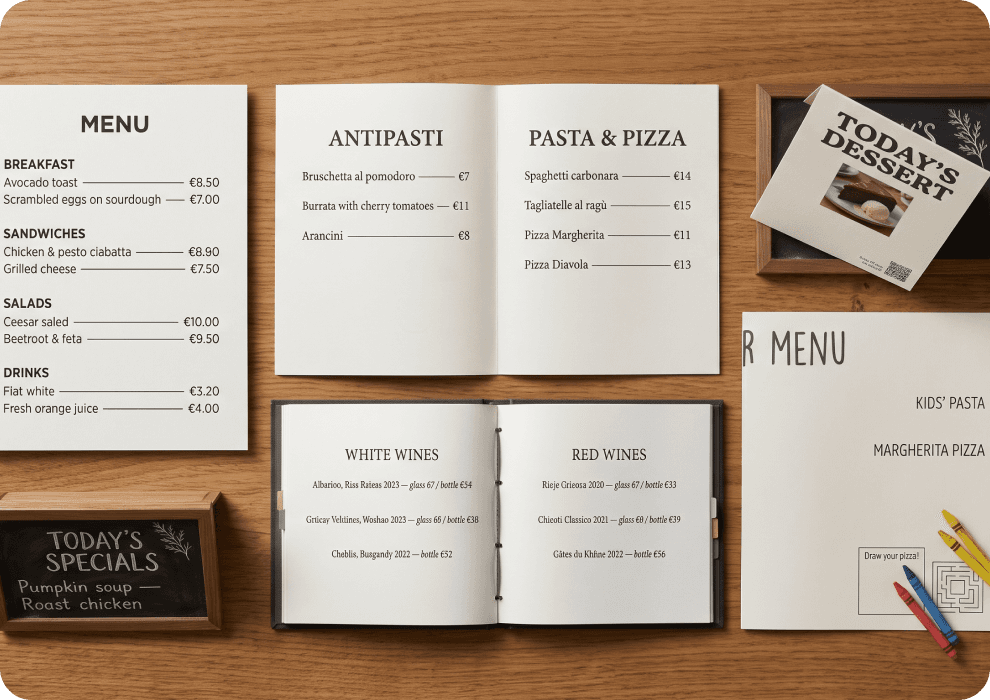
You open a print shop’s template catalogue. There are 200 menu designs inside. Some are black and gold, some have watercolour lemons, some look like old French newspapers. After ten minutes, they all start to look the same.
The problem is not taste. A menu is a tool, and the right style depends on what you want it to do. Some menus help guests decide fast. Others sell extra drinks, tell a brand story or survive weekly price changes.
In this guide, you get ten printed menu styles. For each one, you see the goal it serves, the venues it suits, and the mistakes to avoid. You also get basic design and EU rules that apply to every style.
Before you pick a style: 4 questions
Answer these four questions before you look at any template. They will cut the catalogue from 200 designs to a handful.
What is your concept?
A harbour seafood terrace and a quiet tasting-menu room need different menus. Write down three words that describe your venue, such as “relaxed, family, Italian”. Then reject every style that does not match them.
How long is your menu?
We’d start here, because length decides the format more than anything else. Fifteen dishes fit on one sheet. Sixty dishes plus a wine list need folds or pages. Count your items first, then choose.
How often do prices and dishes change?
If you change dishes every week, an expensive booklet is the wrong choice. Each change means a reprint. A market-driven kitchen needs a format that is cheap to replace or easy to rewrite.
Who are your guests?
Tourists who do not speak the local language need pictures or clear dish names. Families need something for the children. Regulars who know the menu by heart need only the specials. Think about the guest at the table, not the designer’s portfolio.
10 printed menu design ideas and what each one does
Each style below shows what it looks like, what it does and where it goes wrong.
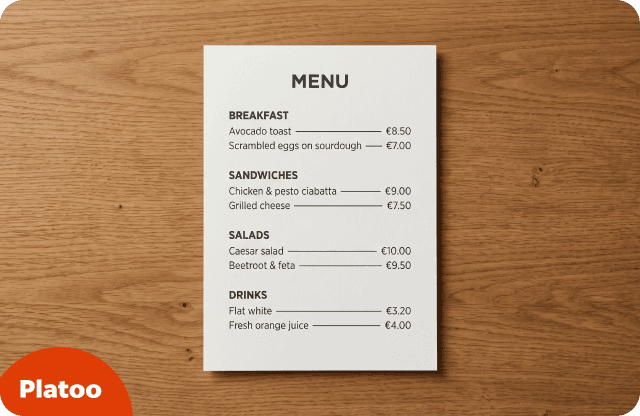
1. Single-page menu
One sheet, printed on one or both sides, with a few clear sections. Think of a lunch café with soups, sandwiches, salads and drinks.
Goal: Help guests decide fast and keep reprints cheap and easy.
Best for: Cafés, bakeries, street food, lunch spots and short menus that fit on one side.
Design tips:
- Keep three to five clear sections in reading order, from top-left down.
- Print on heavy matt card, or laminate it.
- Leave white space instead of making the font smaller.
Watch out: Do not cram in too many items. Once you need tiny text to fit everything, move to a bi-fold.
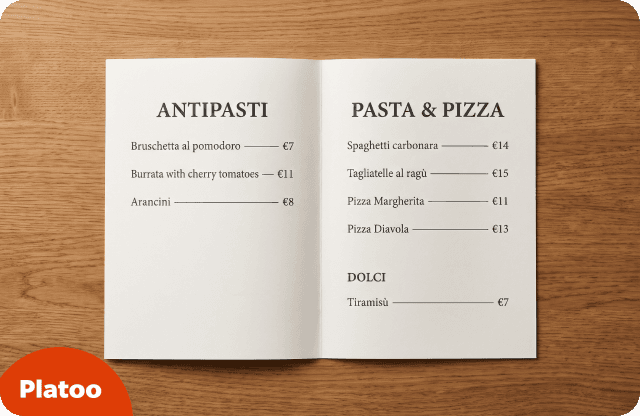
2. Bi-fold and tri-fold menu
One sheet folded once (two panels) or twice (three panels). This is the classic menu most guests expect in a sit-down restaurant.
Goal: Split a larger menu into logical sections that guests read like a book.
Best for: Full-service casual restaurants, trattorias and family restaurants.
Design tips:
- Follow book order: starters on the left, mains in the centre or on the right.
- Give mains the clearest space, because guests often choose them first.
- Use durable cover stock or lamination.
Watch out: Too many panels create too much choice, and one price change means reprinting the whole piece.
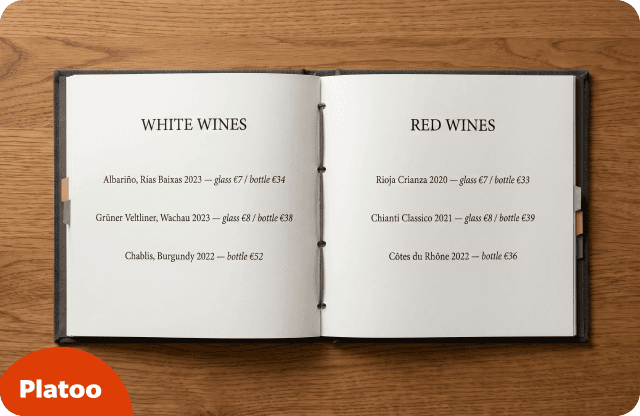
3. Booklet menu
Several pages bound together, often with a hard cover. It is most common for wine lists and long cocktail menus.
Goal: Present a large drinks or wine list with depth and a premium feel.
Best for: Wine bars, cocktail bars, hotel restaurants and venues with large drinks lists.
Design tips:
- Add a contents page or tabs so guests can find sections fast.
- Group wines by style or region, not only by colour.
- Use replaceable inserts, such as a screw-post binder, for pages that change.
Watch out: Booklets are heavy, slow to read and expensive to update. An out-of-stock vintage damages trust.
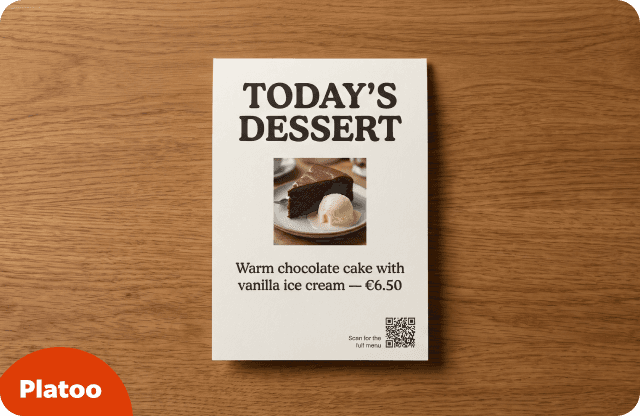
4. Table tent
A small folded card that stands on the table. It usually promotes desserts, a cocktail of the week or a weekday deal.
Goal: Sell specials, desserts, drinks and promotions at the table.
Best for: Bars, cafés, pubs and casual dining, always next to the main menu.
Design tips:
- Put one message on each side, with a large headline.
- Use one strong image or a short description of two or three items.
- Add a QR code for full details.
Watch out: Table tents clutter small tables. Remove old promotions as soon as they end.
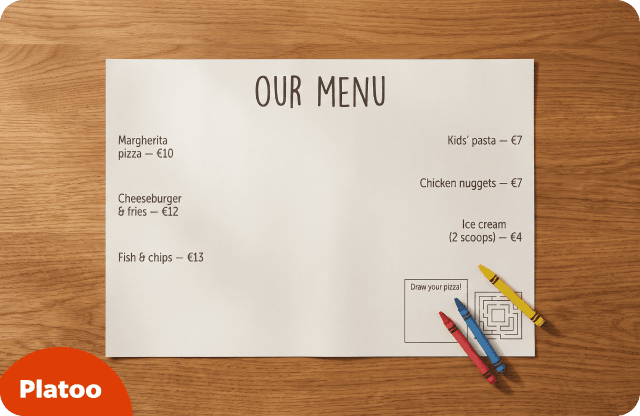
5. Placemat menu
The menu is printed on the paper placemat itself. Guests read it while they wait, and children can colour in a corner.
Goal: Combine menu and table setting for fast ordering and high table turnover.
Best for: Diners, family restaurants, pizzerias, beach bars and kids’ areas.
Design tips:
- Use cheap paper stock that you can reprint often.
- Leave the centre free for the plate.
- Add a simple kids’ activity corner, such as a maze or a drawing space.
Watch out: Placemats are single-use paper, stains hide the text, and the style feels too casual for upscale venues.
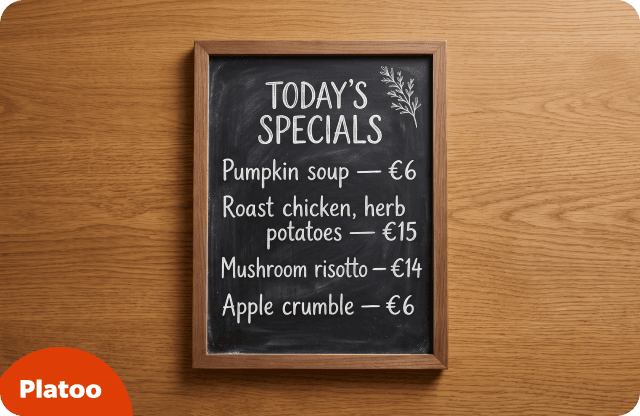
6. Chalkboard menu
A blackboard on the wall or on an easel, written by hand each day. It is not printed, but it often works next to a printed menu.
Goal: Show freshness and daily change while keeping full flexibility.
Best for: Bistros, wine bars, cafés and market-driven or seasonal kitchens.
Design tips:
- Use it for specials, and keep a printed core menu.
- Make the lettering big enough to read from the far side of the room. Test it from the back table.
- Write prices clearly, with taxes included.
Watch out: Chalk is hard to read from far away or for low-vision guests. You still need allergen and price information.
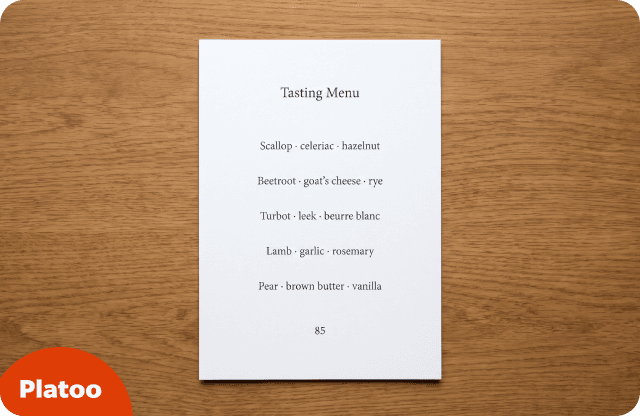
7. Minimalist typographic menu
Only type, white space and short lines. There are no pictures, borders or decoration. The dish names do all the work.
Goal: Put ingredients and the dish first, and express a calm, premium brand.
Best for: Fine dining, tasting menus, specialty coffee and modern bistros.
Design tips:
- Use one or two typefaces and generous white space.
- Write short descriptions led by ingredients: “Beetroot, goat’s cheese, hazelnut”.
- Show prices as plain numbers, which fits the style (see Prices below).
Watch out: Thin, pale or tiny fonts with low contrast make the menu hard to read.
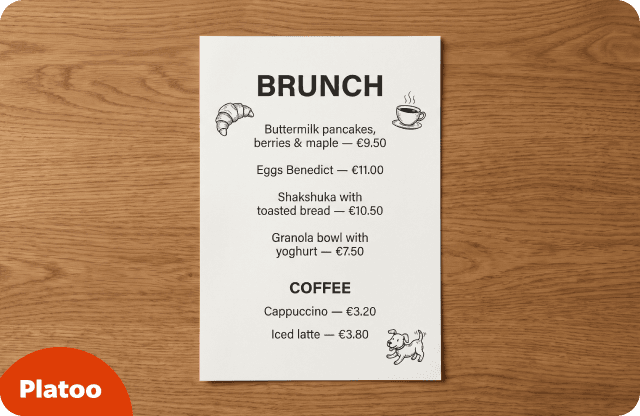
8. Illustrated menu
Hand-drawn art around the dishes: a sketched croissant, a local landmark, the owner’s dog. The menu becomes part of the brand.
Goal: Tell a brand story and create a personality guests remember and share.
Best for: Independent cafés, brunch spots, bakeries, craft breweries and family venues.
Design tips:
- Use illustrations as accents, not behind the text.
- Keep the dish list in a plain, readable font.
- Reuse the illustrations on signs and social media.
Watch out: Busy art behind text hurts readability, and custom artwork makes reprints costly.
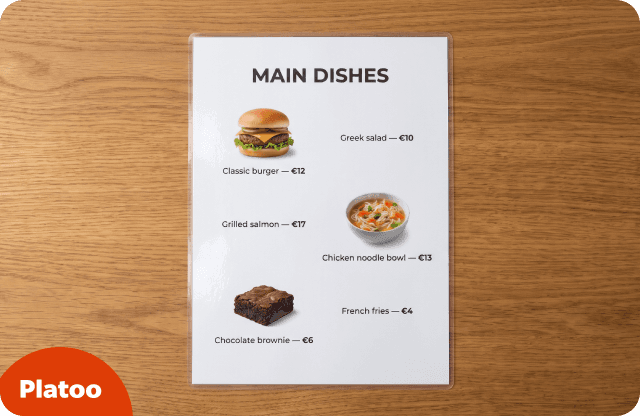
9. Photo menu
Dish names with real photos next to them, usually laminated. Guests point at a picture and order.
Goal: Help guests decide fast, especially when they do not speak the language.
Best for: Tourist areas, Asian restaurants, fast casual, burger and dessert places.
Design tips:
- Use real, professional photos of the actual dish.
- Pair each photo with a clear, descriptive dish name.
- Show photos for best sellers only.
Watch out: Photos can look cheap in upscale venues, and they work less well with vague dish names. The plate must match the picture.
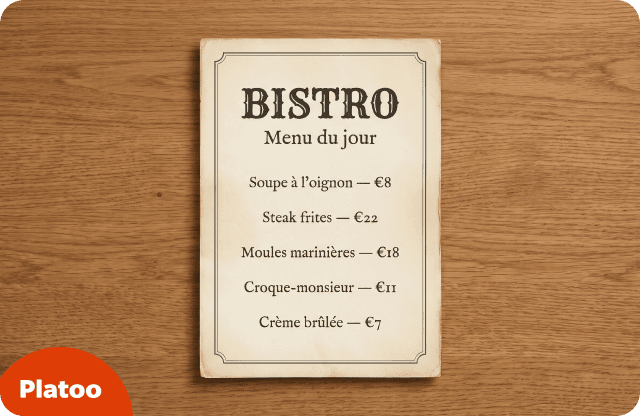
10. Vintage bistro menu
Old-style fonts, thin borders and cream paper. It looks like a menu from a 1920s Paris brasserie or a 1950s diner.
Goal: Create atmosphere and nostalgia that match the venue’s interior and story.
Best for: Bistros, brasseries, diners, cocktail bars and traditional taverns.
Design tips:
- Pick one era and stay consistent.
- Combine a decorative headline font with a plain body font.
- Use textured matt paper for an authentic feel.
Watch out: Ornate scripts and ALL CAPS reduce readability, and the style can feel like a theme-park copy.
| Style | Main goal | Best for |
|---|---|---|
| Single-page | Fast decisions, cheap reprints | Cafés, bakeries, street food, lunch spots |
| Bi-fold / tri-fold | Structure a larger menu | Casual full-service restaurants, trattorias |
| Booklet | Present a large drinks or wine list | Wine bars, cocktail bars, hotel restaurants |
| Table tent | Sell specials, desserts and drinks | Bars, cafés, pubs, casual dining |
| Placemat | Fast ordering, high turnover | Diners, family restaurants, pizzerias, beach bars |
| Chalkboard | Show freshness and daily change | Bistros, wine bars, seasonal kitchens |
| Minimalist typographic | Dish first, premium calm brand | Fine dining, tasting menus, specialty coffee |
| Illustrated | Brand story and personality | Independent cafés, brunch spots, craft breweries |
| Photo | Fast decisions across languages | Tourist areas, fast casual, burger and dessert places |
| Vintage bistro | Atmosphere and nostalgia | Bistros, brasseries, diners, taverns |
Design basics for any printed menu
Style is the surface of restaurant menu design. These basics decide whether the menu actually works, whatever style you choose.
Readability
Clear print guidance based on RNIB advice recommends matt paper, because it reduces glare. It also suggests dark text on a light background. Avoid italics, ALL CAPS, decorative fonts and text placed over images. We suggest a simple test: hand the proof to someone over 60 in dim light.
Layout
You may have heard about a “sweet spot” where guests look first. A 2012 eye-tracking study by Sybil Yang at Cornell did not find one. Guests read a two-page menu like a book, from the top-left down. The study had only 25 participants and no purchase data. Still, it is a good reason to use simple, logical order.
Prices
A Cornell field study by Yang, Kimes and Sessarego (2009) tested three price formats. With numbers only, without a currency sign, guests spent about 8% more per person. This was one US café, and only that one comparison was significant. In the EU, the final price including taxes is key information under Directive 2005/29/EC, Art. 7(4)(c). National rules may add more.
Photos
Hou, Yang and Sun (2017) found that photos raised willingness to pay when the dish name was clear. With vague names, photos lowered ratings among visually oriented guests. Their online experiments measured intentions, not real orders.
Allergens
Regulation (EU) No 1169/2011, Art. 44, makes allergen information mandatory for non-prepacked food, including restaurant dishes. Each country decides how you provide it. Ireland requires it at least in written form. Austria allows letter codes on the menu, or oral information from trained staff with a visible notice.
Paper and lamination
Choose matt paper or matt lamination for menus that guests handle every day. Use cheaper paper for menus you reprint often. Test one copy with a wet cloth before you order a full run.
Keep the print short: add a QR code
A printed menu cannot do everything. Allergen details, three languages and a full wine list will turn one clean sheet into a crowded booklet.
We’d keep the paper version short and add a small QR code in one corner. The code opens a digital menu, such as Platoo, with dish translations in your guests’ languages, allergen details and dish photos. Guests who want more information scan it. Guests who do not still get a clean, simple printed menu.
To see what guests get after the scan, open an example menu — no sign-up needed.
The digital part also handles change. When a price goes up or a dish sells out, you update it in a few clicks, without reprinting. The printed menu then holds only what rarely changes.
If retyping the whole menu is what stops you, and the Platoo team will set up the digital version for free.
Try it on your next printed menu
Create a free Platoo account, add your dishes and put the QR code in a corner of the menu you already have.
Start for freeRelated reading
FAQ
By format, the main types of menus in print are single-page, bi-fold or tri-fold, booklet, table tent, placemat and chalkboard. By visual style, common options are minimalist, illustrated, photo and vintage bistro. Most venues combine them, for example a bi-fold main menu with a chalkboard for daily specials and a table tent for desserts.
For most small restaurants, a single-page menu or a simple bi-fold works best. Both are easy to read and cheap to reprint. Add a chalkboard for daily specials, so the printed menu stays stable. In our view, a short menu that is easy to read is better than a long one that looks impressive.
You can choose either way. A Cornell study at one US café found that guests spent about 8% more with numbers-only prices. That is one venue, so treat it as a hint, not a rule. In the EU, what matters legally is showing the final price, including taxes.
Matt paper is usually the best choice, because it reduces glare and is easier to read. For menus that guests handle every day, use heavy card or matt lamination. For placemats or menus you reprint often, cheaper paper is fine. Always print one test copy before ordering the full run.
Sources: Cornell University eCommons — The Effect of Menu Price Formats on Restaurant Checks (Yang, Kimes & Sessarego) · Cornell Chronicle — Menu price formats and restaurant spending · International Journal of Hospitality Management — Eye movements on restaurant menus: A revisitation on gaze motion and consumer scanpaths (Yang, 2012) · White Hutchinson Leisure & Learning Group — How diners read menus · Durham University — Menu pictures and dish names (Hou, Yang & Sun, 2017) · legislation.gov.uk — Regulation (EU) No 1169/2011, Article 44 · legislation.gov.uk — Directive 2005/29/EC, Chapter 2, Section 1 · Food Safety Authority of Ireland — Allergen information for non-prepacked food · WKO (Austrian Economic Chambers) — Allergen information in gastronomy · Scottish Borders Council — Clear print guidelines